Back
WooUseful Wise Payment Gateway

Wise Payment Gateway for WooCommerce

Accept payments through Wise with a controlled checkout flow.

Offer Wise as a manual WooCommerce payment option without treating an unverified transfer as paid.

WooUseful Wise Payment Gateway lets WooCommerce stores offer Wise as a manual payment option at checkout.

Customers place their order normally, receive clear payment instructions, and are redirected to your Wise Business payment page with the order amount, currency, and reference already prepared.

Because Wise does not provide a standard payment confirmation API for this type of flow, orders remain safely marked as On hold until you verify the payment.

This gives customers a convenient way to pay through Wise while keeping payment verification under your control.

Manual Wise checkout

What it helps you do

  • Offer Wise at WooCommerce checkout alongside your other available payment methods.
  • Redirect customers to your Wise Business payment page after they place an order.
  • Prepare the payment amount, currency, and order reference automatically to reduce mistakes.
  • Keep Wise orders safely on hold until the incoming payment is manually confirmed.
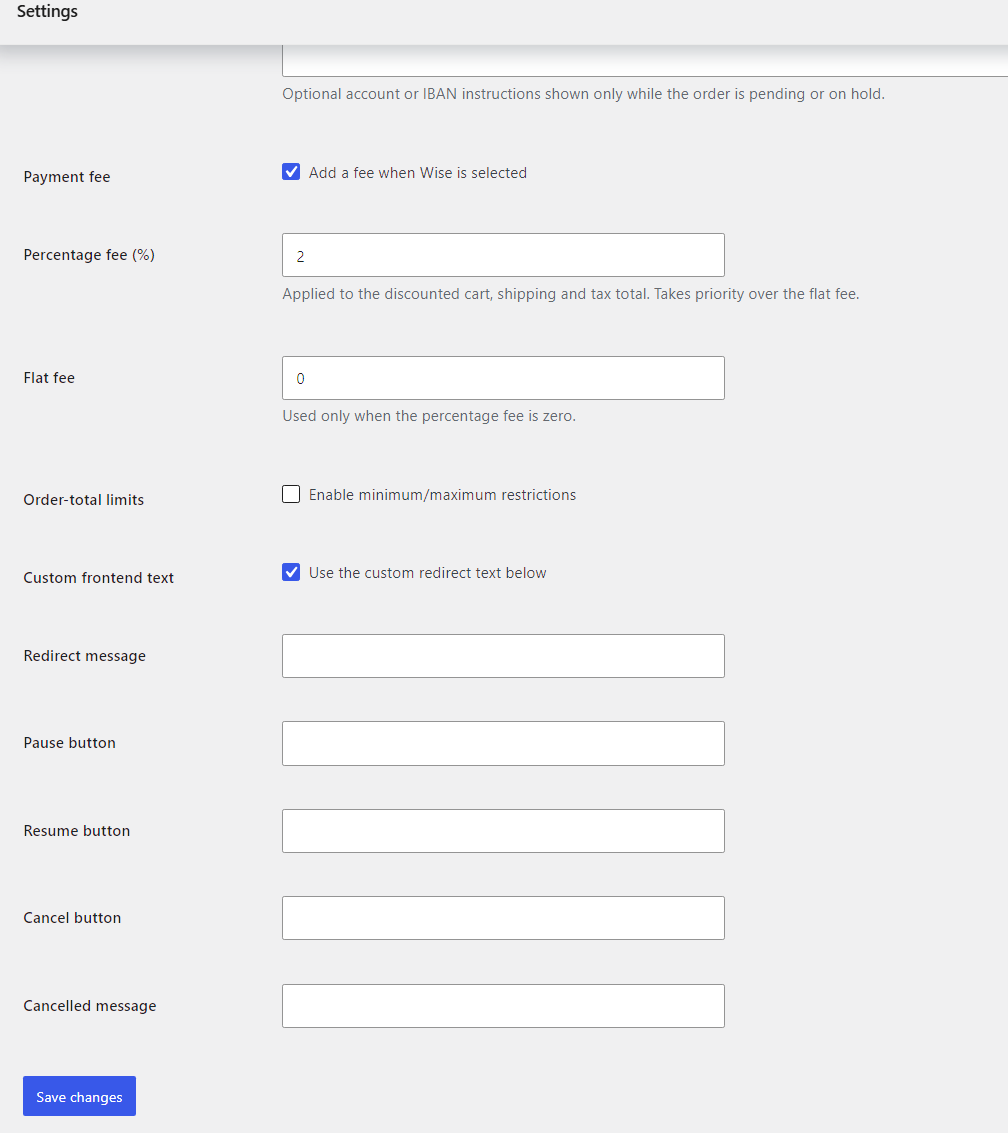
  • Add optional Wise payment fees using either a fixed amount or percentage.
  • Limit Wise payments by order value using optional minimum and maximum totals.
  • Show manual bank-transfer instructions such as IBAN details when needed.
  • Customize the redirect message so customers understand exactly what happens next.
Safe payment status

A safer manual payment workflow

Wise payments handled through this plugin are treated as external manual payments.

When a customer chooses Wise, the plugin creates a normal WooCommerce order and keeps the payment status honest until you verify the money in Wise.

  1. The WooCommerce order is created.
  2. The order is placed in On hold status.
  3. The customer sees a clear redirect notice.
  4. The customer is sent to your Wise payment page.
  5. You verify the payment in your Wise account.
  6. You manually move the WooCommerce order to Processing or Completed.

The plugin never marks an order as paid simply because the customer reached the Wise website.

Result: your store avoids processing unpaid orders and keeps payment status accurate.

Redirect experience

Clear Wise redirect experience

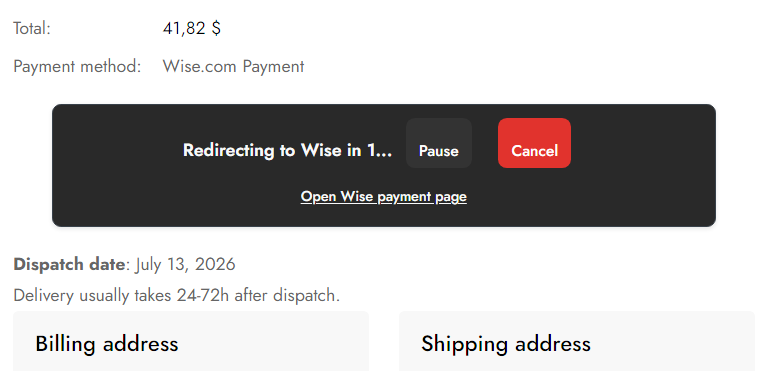
After checkout, customers see a dedicated redirect banner before being sent to Wise.

  • A visible countdown before redirection.
  • A direct link to open the Wise payment page immediately.
  • Pause and resume controls.
  • A cancel option.
  • Responsive styling for desktop and mobile devices.
  • Several banner styles: default, blue, green, dark, indigo, and custom.

This makes the redirect feel like a natural part of checkout rather than an unexpected jump to another website.

Fees and limits

Optional payment fees and order limits

Fixed fees

Add a fixed charge, such as €2 per Wise payment.

Percentage fees

Add a percentage charge, such as 1.5% of the eligible order amount.

Minimum order value

Make Wise available only when the order total is high enough.

Maximum order value

Prevent Wise from being used for especially large orders that need a different payment process.

Wise fees are added as real WooCommerce fee lines, so they appear correctly in checkout totals, WooCommerce orders, customer emails, order details, reports, and accounting records.

Fees are applied only when Wise is selected as the payment method, and the fee system can be disabled with one setting.

Customer instructions

Manual payment instructions and IBAN details

The plugin can display additional payment instructions after checkout and inside the customer’s order details.

  • Your Wise account instructions.
  • IBAN or bank-transfer details.
  • Payment reference guidance.
  • Expected verification times.
  • Important notes for international transfers.

These instructions are shown only while the order is still awaiting payment, helping avoid unnecessary payment messages on completed or cancelled orders.

Simple configuration

Designed for non-technical store owners

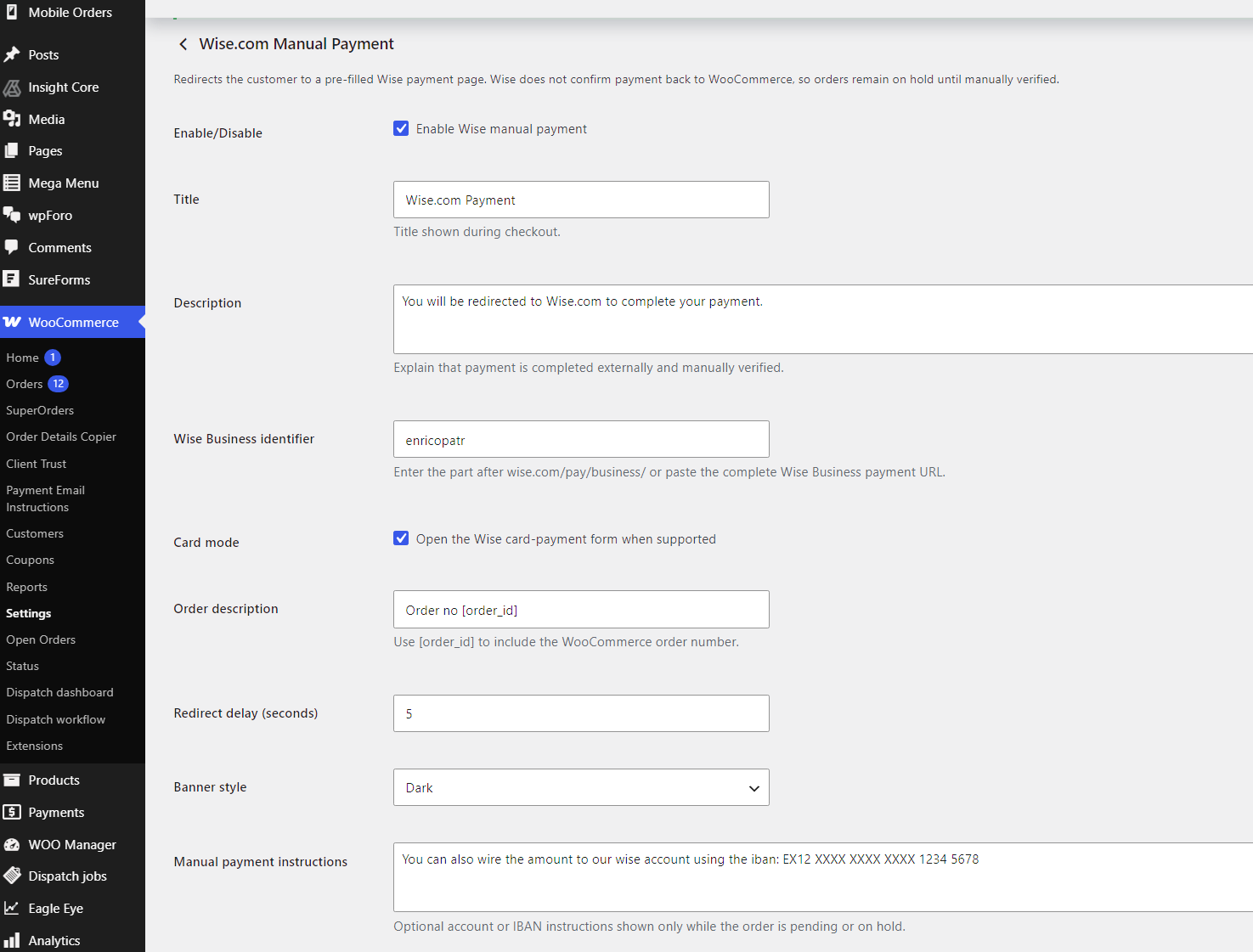
You do not need to connect an API or configure webhooks.

The setup is based on your Wise Business payment identifier or payment-page URL. Once configured, the plugin prepares the redirect automatically whenever the customer selects Wise.

Check Wise

Review your Wise account for the incoming payment.

Match the order

Confirm that the amount and reference match the WooCommerce order.

Update WooCommerce

Move the order status after manual verification.

Editable messages

Customizable customer-facing text

You can edit the main messages shown during the Wise payment process.

  • The checkout payment-method description.
  • The redirect banner title.
  • The redirect explanation.
  • The countdown message.
  • The manual payment instructions.

Custom text can be enabled or disabled without removing the saved content.

WooCommerce-native workflow

Built for WooCommerce order management

Wise orders remain part of your normal WooCommerce workflow. There is no separate order system to learn.

  • Creates the order before redirecting the customer.
  • Stores Wise as the selected payment method.
  • Places the order on hold while payment is unverified.
  • Adds a clear internal order note.
  • Reduces stock using WooCommerce safeguards.
  • Keeps the order available in the standard WooCommerce order screens.

HPOS support: the plugin declares compatibility with WooCommerce High-Performance Order Storage and uses WooCommerce order methods for normal order handling.

Important limitation

Important payment-status information

This plugin does not receive automatic payment confirmations from Wise.

A customer reaching the Wise page does not prove that payment was completed.

  • Orders are not automatically marked as paid.
  • Orders remain On hold until manually verified.
  • The store administrator must confirm the transaction inside Wise.
  • The order status must then be updated manually.

This behaviour is intentional. It helps prevent unpaid orders from being processed.

Best fit

Typical use cases

  • Stores that already receive customer payments through Wise.
  • International stores that want another transfer option.
  • Stores that want customers to receive a prepared Wise payment link.
  • Businesses that prefer manual payment verification over automatic card processing.
  • Stores that need to add an optional payment-method fee.
  • Stores that want clearer instructions than a generic bank-transfer gateway provides.
Feature overview

Key features

  • Wise payment method for WooCommerce checkout.
  • Automatic Wise Business payment-page redirection.
  • Order amount, currency, and reference included in the redirect.
  • Manual and external payment workflow.
  • Orders remain On hold until verified.
  • Fixed or percentage payment fees.
  • Optional minimum and maximum order values.
  • Custom checkout and redirect messages.
  • Multiple redirect-banner styles.
  • Pause, resume, cancel, and direct-payment controls.
  • Manual IBAN and payment instructions.
  • Responsive frontend design.
  • WooCommerce HPOS compatibility.
  • No Wise API required.
Setup

Simple setup

  1. Install and activate the plugin.
  2. Open the WooCommerce payment settings.
  3. Enable the Wise payment method.
  4. Enter your Wise Business identifier or payment-page URL.
  5. Configure optional fees, limits, instructions, and redirect styling.
  6. Save the settings.

Wise will then appear as an available payment method for eligible orders.

WooUseful Wise Payment Gateway

Give customers another practical way to pay.

WooUseful Wise Payment Gateway connects WooCommerce checkout with your Wise payment page while keeping order verification under your control.

Customers receive a smoother payment experience, your store receives properly created WooCommerce orders, and no transfer is treated as paid before you confirm it.

Reviews

There are no reviews yet.

Only logged in customers who have purchased this product may leave a review.

Releases

Version 1.1.2 Latest

Released July 10, 2026111954213 KB
    • Declares cart_checkout_blocks compatibility as true.
    • Adds a WooCommerce Blocks payment integration class.
    • Registers Wise using registerPaymentMethod().
    • Displays the configured gateway title and description in Block Checkout.
    • Uses the button label Place order and continue to Wise.
    • Applies minimum and maximum availability rules inside Block Checkout.
    • Keeps classic checkout support.
Assets 1

Download assets are visible to customers who own this item.

Version 1.1.1

Released July 10, 20261756d6411 KB

Stable

  • Treats Wise as an external/manual payment method.
  • Places orders on On hold, never automatically paid.
  • Adds an order note explaining that manual verification is required.
  • Adds percentage or flat fees as real WooCommerce fee lines.
  • Applies fees only while Wise is selected.
  • Enforces the fee, min/max, notice, and custom-text enable switches.
  • Supports order-pay pages when checking min/max restrictions.
  • Validates and sanitizes the Wise Business identifier.
  • Accepts either the identifier or a full Wise Business payment URL.
  • Builds the Wise URL safely using WooCommerce order amount, currency, and order number.
  • Shows manual IBAN/instructions only for pending or on-hold orders.
  • Adds pause, resume, cancel, and direct Wise-link controls.
  • Refreshes classic checkout totals when the payment method changes.
  • Declares HPOS compatibility.
  • Loads the translation domain.
  • Corrects the invalid CSS declaration.

Because Wise provides no payment callback, the store administrator must verify the incoming payment and manually move the order from On hold to Processing or Completed.

Assets 1

Download assets are visible to customers who own this item.
Files / Downloads

Browse releases

You can review the release history for this product here. Download links are shown only to customers who own this item.

Version 1.1.2 LatestJuly 10, 2026
Download available after purchase
Version 1.1.1July 10, 2026Stable
Download available after purchase

Support

Need help with Wise Payment Gateway for Woocommerce? Join the WooUseful community to post bugs, ask questions, share suggestions, and see what other users have reported.

What's your preferred currency?

Choose the currency that feels most comfortable. You can change it later.

Saving… Currency saved. Could not save currency.